

Phone numbers, porting and texting registration
Who can do this: Owners and Office Managers can see numbers and texting status and ask NixDent for changes. NixDent sets up numbers, moves (ports) numbers and registers texting.
Why you can’t buy or change a number yourself
Section titled “Why you can’t buy or change a number yourself”Phone numbers are set up by NixDent so each one is tied to the right office and the right AI receptionist. On your side you can see them and ask for changes. Older links to a “Phone numbers” page now open Settings → Patients and AI → AI receptionist.
See your numbers
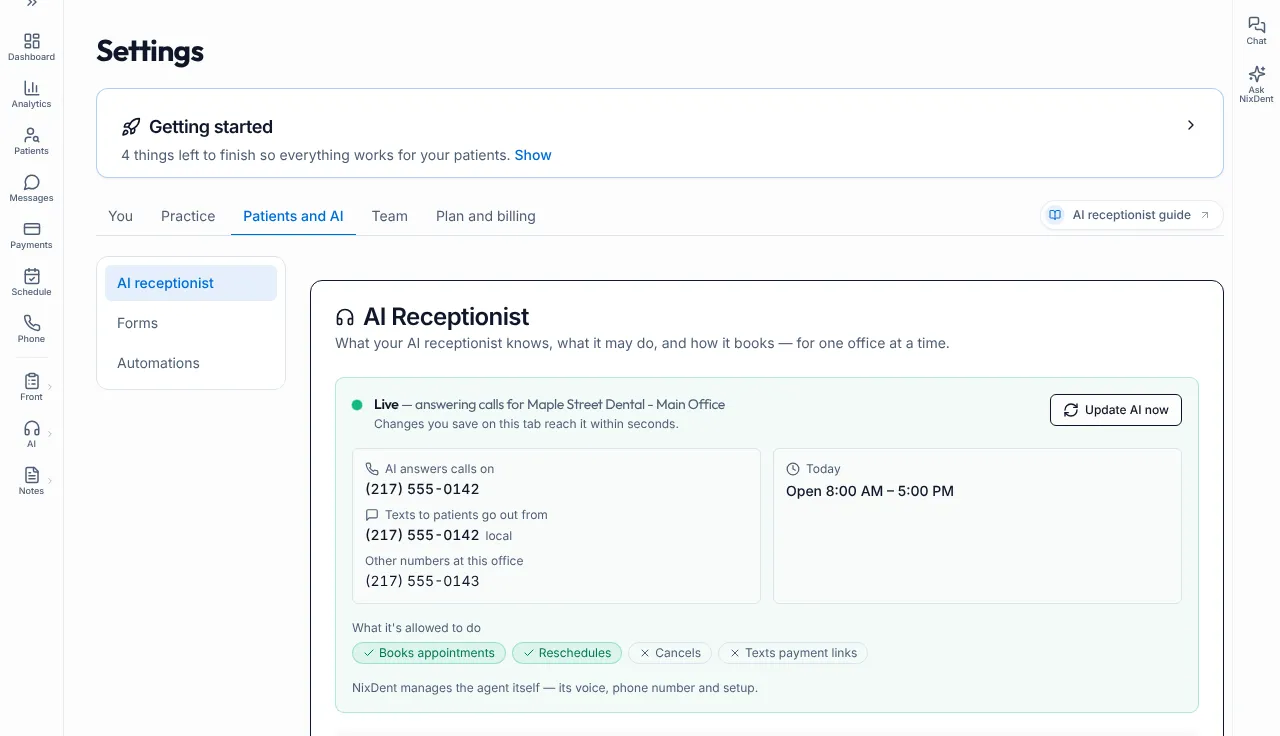
Section titled “See your numbers”Go to Settings → Patients and AI → AI receptionist. The green Live card shows:
- AI answers calls on: the number that rings your AI receptionist. A toll-free tag appears if it is toll-free.
- Texts to patients go out from: the number patients see on texts. It is tagged local or toll-free.
- Other numbers at this office: anything else NixDent has set up, such as a fax line.
| What you see | What it means | What to do |
|---|---|---|
| Not set up yet with Request setup | The office has no AI receptionist yet. | Click Request setup. |
| Not recorded yet — NixDent will confirm it. | The AI is live but the number isn’t listed in Settings. | Use Request to ask NixDent to confirm. |
| No texting number yet with Ask for one | Nothing can send texts for this office. Confirmations, reminders and links won’t go out. | Click Ask for one. |
On the Getting started checklist, these show as Number that rings the AI and Texting number.
Move your existing number to NixDent (porting)
Section titled “Move your existing number to NixDent (porting)”Moving (“porting”) your current office number lets patients keep dialing the number they know. NixDent does the paperwork with the carriers. You gather the details and approve.
Ask NixDent to start: click Request on the Getting started checklist or contact NixDent support and say you want to move a number.
Have this ready:
- The number or numbers to move
- The business name on the account with your current carrier
- The name of the person who can authorize the move
- Your carrier account number
- Your carrier PIN or passcode, if it has one
- The service address exactly as on your carrier bill
- A recent carrier bill
- A signed letter of authorization. NixDent tells you how to sign it.
Details must match the carrier’s records exactly. A mismatch is the most common reason a move is rejected.
Texting registration
Section titled “Texting registration”Wireless carriers require every business that texts patients to be registered. Until your registration is approved, carriers may block texts.
Go to Settings → Practice → Practice details and scroll to SMS Messaging. Each office shows a Verification status:
| Status | What it means | What to do |
|---|---|---|
| Not Started | Nothing submitted yet. | Fill in Practice details completely, then ask NixDent to start. |
| Under Review | Submitted and being checked. | Wait. |
| A status starting with Waiting on | The registration is with the carrier. | Wait. |
| Action Required | The carrier needs something from you. The reason is shown under Action required:. | Fix it, or contact NixDent with the message. |
| Verified | Texting is active for this office. | Nothing. |
| Rejected | The registration was refused. | Contact NixDent. |
Also on this card:
- Download Paper Consent Form gives a PDF you can use to collect written texting consent from patients.
- Patient Opt-In Page (when live) shows your public sign-up page address and a Preview button. Link to it from your website or hand it out. The page is titled Patient SMS Communication Consent. It asks for Full Name, Mobile Phone and Email Address, and has two separate tick boxes: Appointment & Office Communications and Exclusive Offers & Promotions (marketing, optional). Each carries the STOP/HELP wording and links to the privacy policy and terms.
The opt-in page goes live automatically when NixDent submits your registration. You do not switch it on. Until then the card shows only the status and the paper form.
Common problems
Section titled “Common problems”Texts aren’t sending. See Texts aren’t sending.
The AI doesn’t answer my old number. Only the number listed under AI answers calls on rings the AI. Your old number won’t reach it until it has been moved or forwarded. Ask NixDent.
My 911 address isn’t set. If your office uses NixDent Phone, each phone line needs a 911 address. The checklist item 911 address on every phone tells you which lines are missing one. NixDent sets this up.