

How the AI receptionist handles calls
Who can read this: Everyone. Owners and Office Managers change the settings it mentions.
This page describes what happens when a patient calls an office that uses the NixDent AI receptionist, so you know what to expect and what to put in your settings.
The call, step by step
Section titled “The call, step by step”- It answers. It says your greeting, or “Thank you for calling” and your practice name if you haven’t written one. See What to give your AI receptionist.
- It finds out why they called: schedule, reschedule, cancel, a question, an emergency, or a message.
- It asks whether they are a current patient or this is their first visit.
- It checks who they are (existing patients) or collects their details (new patients).
- It does the job: offers two times, books, moves, or takes a message.
- It confirms, asks about family members, says goodbye and hangs up.
The AI keeps replies short, asks one question at a time, and says a short phrase like “One moment” while it looks something up, so the line never goes quiet. If it can’t hear a caller clearly it asks them to repeat.
Checking who is calling
Section titled “Checking who is calling”Existing patients. The AI asks for the caller’s full name and date of birth together. It does not suggest or read out a name. The caller says their own. Until the caller passes the check, the AI gets no details about the record. It can’t book, move or cancel for them until they pass.
If the details don’t match, the AI reveals nothing about the record and asks them to try again. If the caller still can’t be matched, it offers to take a message.
New patients. The AI collects first and last name, date of birth, a callback number, email and how they heard about you. Then it asks whether they want a routine checkup and cleaning or have a specific issue, and books.
What it can do
Section titled “What it can do”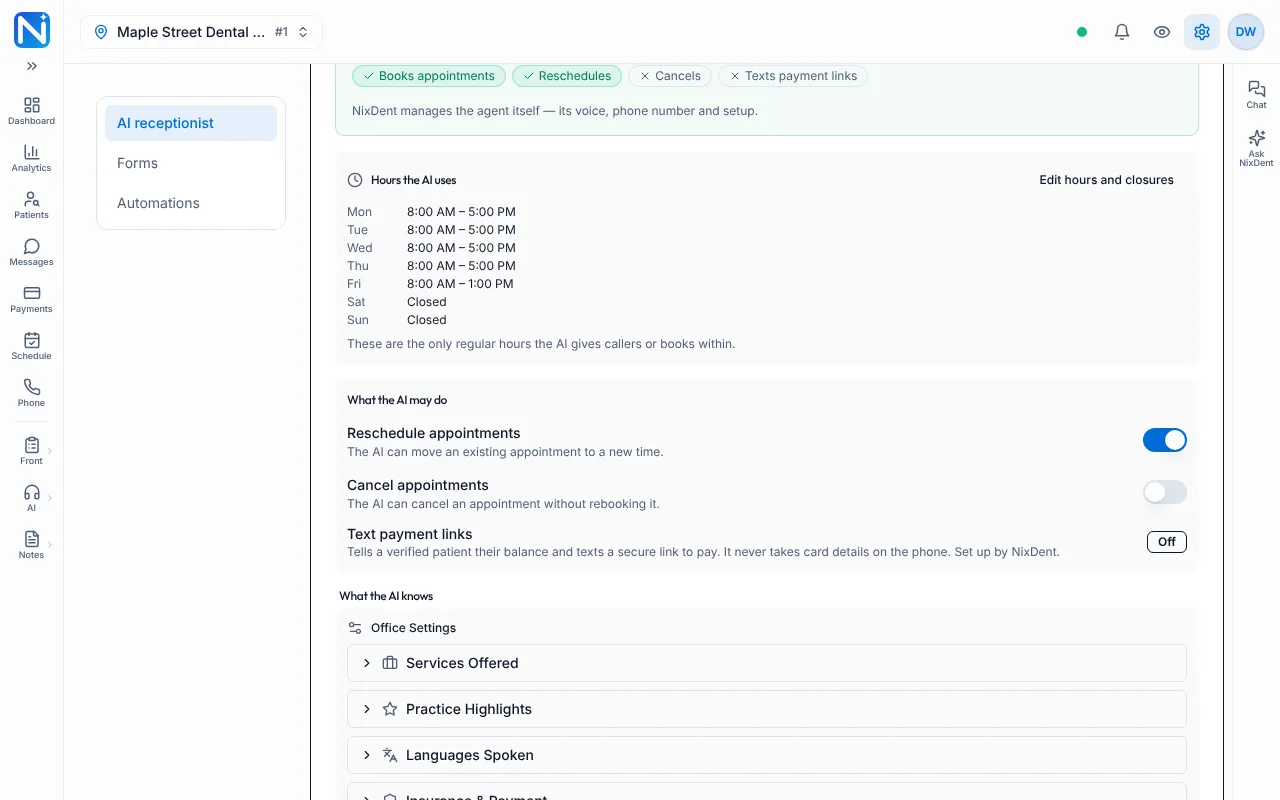
| Action | When | Notes |
|---|---|---|
| Book | New and verified existing patients | From your real Open Dental schedule. Only within your open hours, never on a closed day, and only in the rooms and with the providers you chose. It offers two options, today and tomorrow first. |
| Reschedule | On by default | It books the new time first, then releases the old one, so a caller is never left with no appointment. If the caller doesn’t settle on a new time, the old appointment stays. |
| Cancel | Off by default | When off, it tries to move the appointment instead, and if the caller still wants to cancel it takes a message for your front desk. It never tells a caller their appointment is cancelled. |
| Take a message | Any time | Goes to your Messages inbox and your call summary email. |
| Text a payment link | Only if NixDent has switched on text-to-pay for your office | For a verified existing patient. It never takes card numbers on the phone. |
You switch rescheduling and cancelling in Settings → Patients and AI → AI receptionist → What the AI may do.
After a booking it repeats the time back and asks whether to schedule other family members. A booking shows up in Open Dental shortly after the call, not at that instant. See A booking didn’t appear in Open Dental.
What it won’t do
Section titled “What it won’t do”- It won’t say an appointment is booked unless the booking really succeeded during the call.
- It won’t read out a caller’s insurance on file, treatment plan, chart notes, address, email or phone. It takes a message for the front desk instead.
- It won’t quote a price you haven’t written down.
- It won’t invent an address or phone number. If you haven’t entered them, it says so and takes a message.
- It won’t give medical advice.
Speaking to a person: transfer or message?
Section titled “Speaking to a person: transfer or message?”The AI does not transfer a call to a person. If a caller asks for the front desk, a doctor, or someone by name:
- Office closed right now: it says so honestly, offers to help itself, and if the caller still wants that person it takes a message and tells them the team will call back when you reopen.
- Office open right now: it says that person can’t take the call at the moment, and offers to help or take a message.
If you want some calls to ring a person, route them with your phone system. See Phone numbers, porting and texting registration and Make and take calls with NixDent Phone.
After hours and holidays
Section titled “After hours and holidays”The AI answers every call, any hour. The Settings page says it plainly: “Closed today — the AI still answers calls.”
- It uses your hours and closure dates. It doesn’t offer times outside your hours or on a closed day.
- It can tell a caller you’re closed on a date, and offer the next open day.
- Messages and call summaries are emailed to the people you chose, so the team sees them first thing. See Call summaries and the huddle brief.
Hours are only mentioned when a caller asks.
Emergencies
Section titled “Emergencies”If a caller has a dental emergency, the AI sounds concerned, asks which tooth, how long it has hurt and how bad the pain is, then goes to the soonest same-day time. It does not diagnose.
Where to see what happened
Section titled “Where to see what happened”Open AI Receptionist → Call Logs. Each call shows its date, caller, phone, type (New Patient, Existing Patient, Unknown), status (Booked, Rescheduled, Canceled, Message Taken, Inquiry, Needs Staff, No Action), duration and follow-up, with a transcript and a recording. See Review what the AI handled.