

How the AI receptionist books, reschedules and cancels
Who can do this: Everyone can read this page. Owners and Office Managers can change the settings it describes, unless NixDent has locked them for your office.
The AI receptionist books straight into your Open Dental schedule. It doesn’t use a separate calendar. This page explains what it can and can’t do, so you can predict what callers will get.
What happens on a booking call
Section titled “What happens on a booking call”- The AI confirms who the caller is. For an existing patient it asks for full name and date of birth and matches them to Open Dental. It won’t book until that check passes. A parent booking for a child is checked for each child.
- A new caller gets a patient record. If nobody matches, the AI collects first name, last name, date of birth, phone number and email, and creates the patient in Open Dental first. A caller who matches an existing record by phone and name isn’t duplicated.
- It looks for open times. It searches about two weeks ahead and reads out a few options spread across the day. If the caller names a provider, it searches that provider only.
- It books the time the caller picks. The appointment is sent to Open Dental and shows on your schedule once it arrives, usually within a minute.
- If anything fails, the AI tells the caller the office will call back to schedule, and can take a message. The call still appears in Call and chat logs.
The appointment note in Open Dental ends with Created by NixDent (Phone AI), so your team can tell AI bookings apart from ones typed by hand.
What limits where and when it books
Section titled “What limits where and when it books”| Control | Where you change it | Effect |
|---|---|---|
| Bookable rooms | Settings → Practice → Booking rules | The AI books only in ticked rooms. With none ticked, it can use every active room. |
| Bookable providers | Booking rules | The AI books only with ticked providers. With none ticked, it can use every available provider. |
| Hours and closures | Hours and closures | It never offers or books a closed day or a listed closure. |
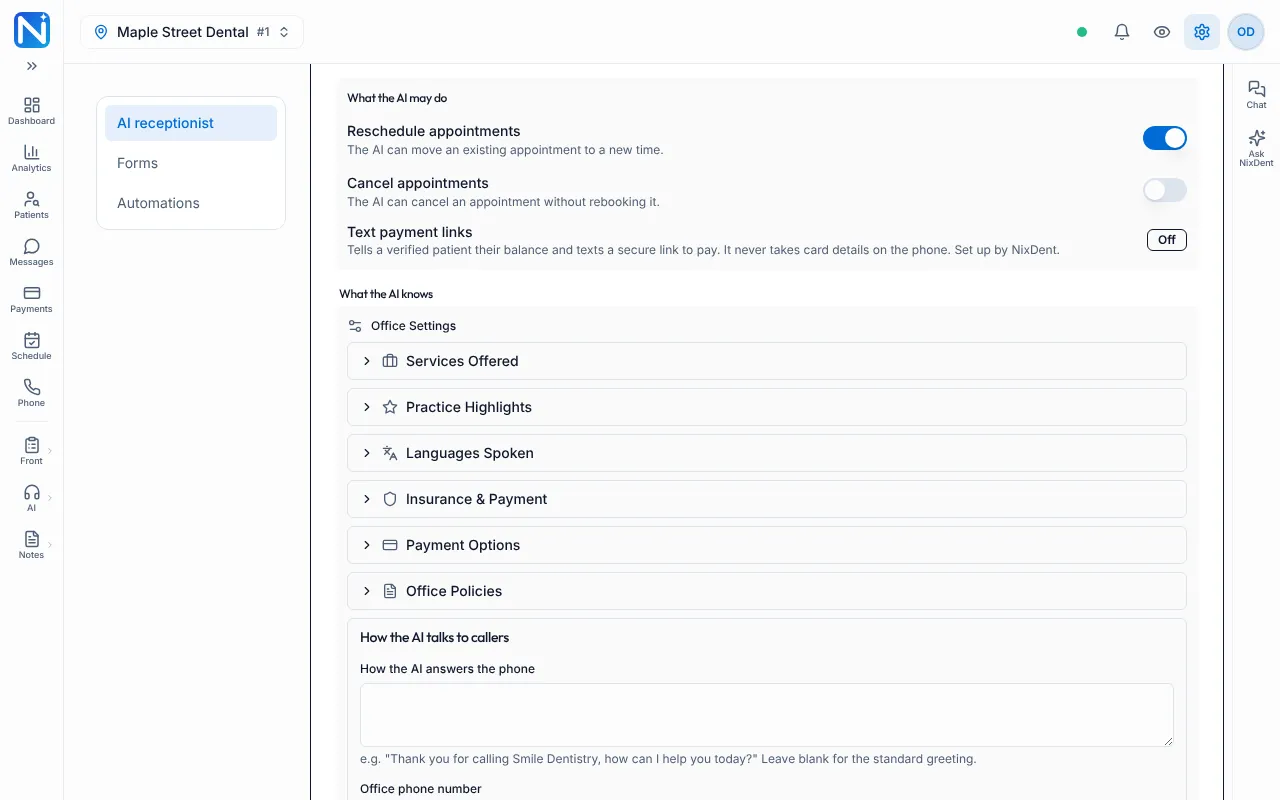
| Reschedule appointments | Settings → Patients and AI → AI receptionist | Allows moving an appointment. On unless you turn it off. |
| Cancel appointments | Same page | Allows cancelling without a new time. Off unless you turn it on. |
| Start-time spacing and default appointment length | NixDent sets these. Use Request. | How far apart the offered times are, and how long a booking is when no appointment type fits. |
Safety checks before every booking
Section titled “Safety checks before every booking”Even after a caller picks a time, NixDent refuses the booking if:
- The patient hasn’t been verified on this call.
- The office is closed that day, or on a listed closure.
- The room or the provider already has an appointment at that time.
- Open Dental has a blockout on the schedule for that time.
- The provider isn’t scheduled to work that day in Open Dental.
The AI then offers a different time.
Rescheduling and cancelling
Section titled “Rescheduling and cancelling”- Reschedule on, Cancel on: the AI can move or cancel appointments. When moving, it books the new time first.
- Reschedule on, Cancel off (the default): the AI can move an appointment, but only after the new appointment is booked. The old one is then cancelled. If the caller doesn’t want a new time, the AI leaves the old appointment alone, tells them it’s still booked, and takes a message for the front desk.
- Reschedule off, Cancel off: the AI tells the caller to phone the office.
- Reschedule off, Cancel on: the AI can cancel, but can’t move.
Because the new appointment is booked first, a patient may briefly have two appointments. Your team can see both on the schedule. If a reschedule is interrupted partway, the old appointment stays.
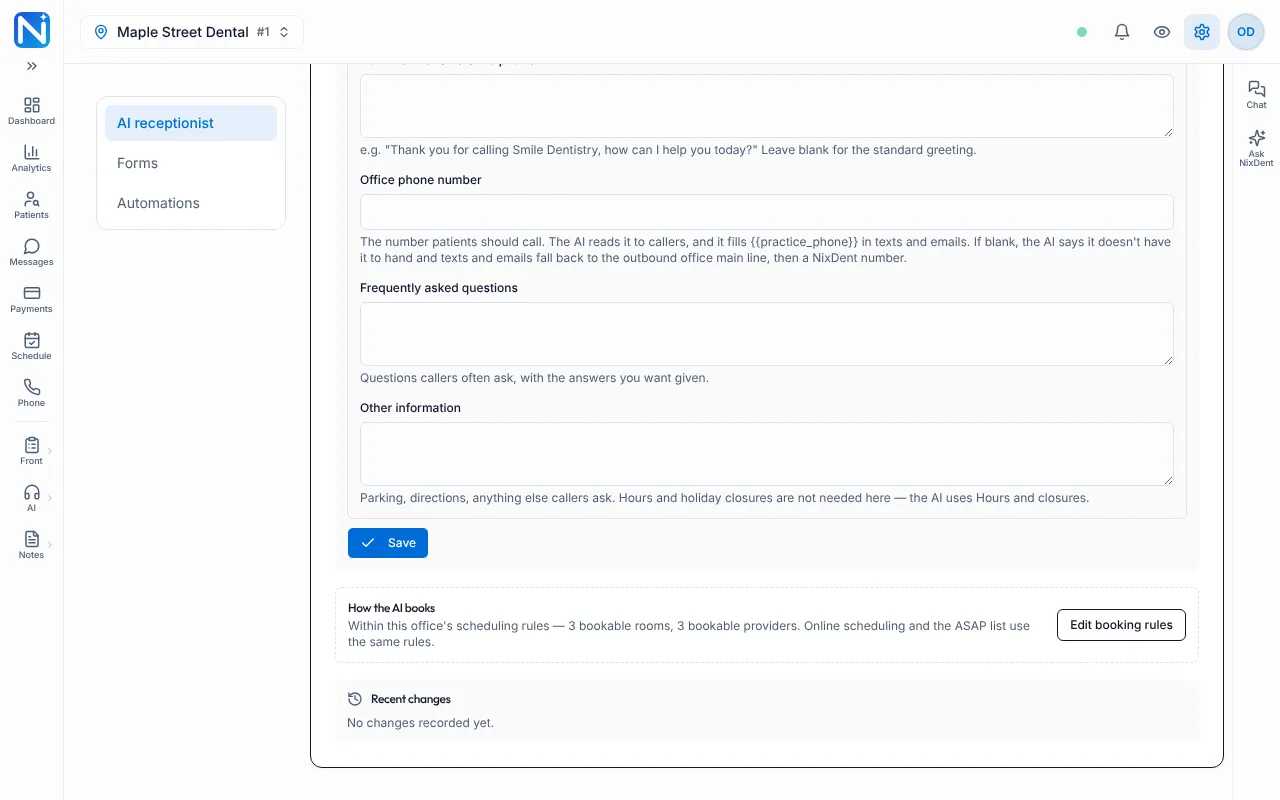
The same page has a box called How the AI books with a button Edit booking rules. It says how many bookable rooms and providers are selected, and takes you to Booking rules. With nothing ticked it reads “every active room” and “every active provider”.
What the AI doesn’t do
Section titled “What the AI doesn’t do”- It doesn’t book outside your ticked rooms and providers.
- It doesn’t book patients it couldn’t verify.
- It doesn’t take card numbers. Payment links are set up by NixDent.
- It doesn’t choose a procedure or treatment plan.
Common problems
Section titled “Common problems”The AI booked the wrong room or provider. Open Booking rules. With nothing ticked, any room or provider can be booked.
The AI offered a day we’re closed. Check Hours and closures and confirm you clicked Save.
An appointment is missing from the schedule. The booking goes to Open Dental first. Wait a minute and refresh. If it’s still missing, see How NixDent connects to Open Dental.
Callers can’t cancel. Cancel appointments is off by default. Turn it on under Settings → Patients and AI → AI receptionist if you want it.
I changed something and the AI still behaves the old way. Changes reach the AI within seconds. If not, click Update AI now on the AI receptionist page.