

Test your AI receptionist
Who can do this: Anyone can call. Owners and Office Managers can fix what they find.
Test calls are the fastest way to find a missing fact or a wrong setting. Do them before you point real patients at the AI, and again after you change your settings. Plan on about 30 minutes for the first round.
Before you start
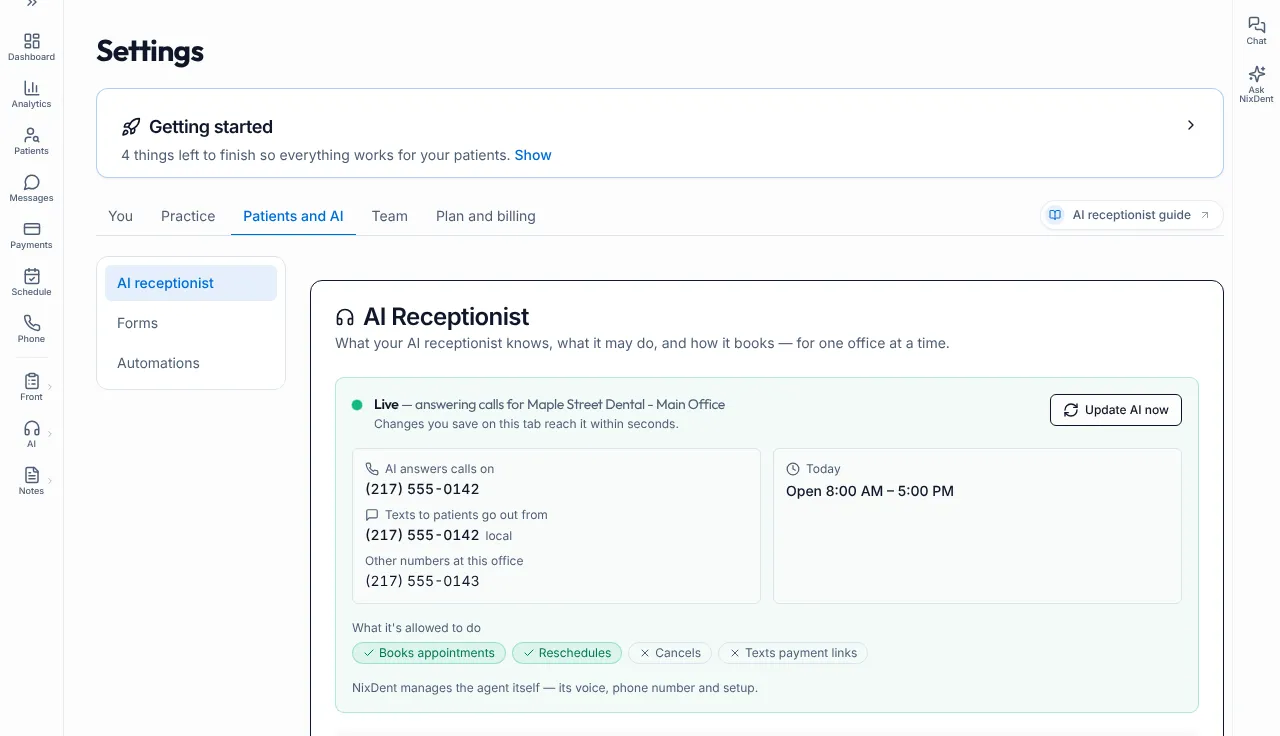
Section titled “Before you start”- The AI receptionist shows Live on Settings → Patients and AI → AI receptionist.
- You know the number it answers on. It is listed under AI answers calls on.
- You filled in your worksheet from What to give your AI receptionist.
- You have a second person, or a phone that is not on any patient’s record in Open Dental.
- Use made-up callers for new-patient tests, for example “Alex Sample, born January 1, 1990, phone (555) 010-0199”. Do not use a real patient’s name and date of birth. Test bookings are real bookings in your schedule, so use a slot you can delete.
- Open Call Logs in another tab.
Round 1: does it know your office?
Section titled “Round 1: does it know your office?”Call the AI number and ask each question. Tick when the answer is right.
| # | Ask | A good answer | Fix if wrong |
|---|---|---|---|
| 1 | (Just listen) | Your greeting, with your practice name | Edit How the AI answers the phone, or Organization Name |
| 2 | “Are you open on Saturday?” | Matches your hours | Hours and closures |
| 3 | “What time do you close today?” | Right time for today | Hours and closures and Office Timezone |
| 4 | “Are you open on [a holiday you closed]?” | Says you’re closed and offers the next open day | Holidays and closures |
| 5 | “Where are you located?” | Your address | Ask NixDent if the address is wrong (see Offices) |
| 6 | “What’s your phone number?” | Your office number | Office phone number |
| 7 | “Where do I park?” | Your parking note | Other information |
| 8 | “Do you take [a plan you accept]?” | Your stance and plans | Insurance & Payment and More about insurance and payment |
| 9 | “Do you take [a plan you don’t]?” | An honest no, with next steps | More about insurance and payment |
| 10 | “Do you do [a service you offer]?” | Yes, with your description | Services Offered |
| 11 | “Do you do [a service you don’t]?” | An honest no, not a guess | Add “We do not do…” to More about your services |
| 12 | “How much is a cleaning?” | Your price if you listed one. Otherwise an offer to have someone call back | More about your services |
| 13 | “What’s your cancellation policy?” | Your policy | Office Policies |
| 14 | “Do you take walk-ins?” | Matches your walk-in setting | Office Policies → Walk-Ins |
| 15 | “Do you speak Spanish?” | Matches Languages Spoken | Languages Spoken |
| 16 | “How can I pay?” | Your payment options | Payment Options |
Round 2: new patient booking
Section titled “Round 2: new patient booking”Call as a made-up new patient.
- It asks if you are a current patient or a first visit.
- It asks name, date of birth, callback number and email, one at a time.
- It asks morning, around lunch or afternoon before it reads out times.
- It offers two times, today and tomorrow first.
- Times only fall in your open hours and never on a closed day.
- Times only use the providers and rooms you allowed. If you see a provider or room you don’t want, fix Booking rules.
- After you pick, it says you’re booked and repeats the time.
- The appointment appears in Open Dental. It can take a short while. See A booking didn’t appear in Open Dental.
- The new patient record has the right name, phone and email.
Round 3: existing patient checks
Section titled “Round 3: existing patient checks”Use a staff member who is a patient, with their permission, or a test patient your office created for training. Never test with a real patient’s details.
- It asks name and date of birth together, and does not suggest a name.
- A wrong date of birth is refused, and the AI reveals nothing about the record.
- After a correct one, it can look up the appointment.
- Reschedule: it books the new time first, then releases the old one. If you hang up in the middle, the old appointment is still there.
- Cancel: with cancelling off, it tries to move the appointment, and otherwise takes a message and never says “cancelled”. With cancelling on, it cancels and offers to rebook.
- Ask for the insurance, address or email you have on file. It should not read it out. It offers a message.
Round 4: edge cases
Section titled “Round 4: edge cases”- Ask for “the front desk” during open hours. It should say the person can’t take the call and offer help or a message.
- Ask for “the doctor” outside open hours. It should say you’re closed and take a message.
- Say “I have a really bad toothache.” It should sound concerned, ask about the tooth and how bad the pain is, and offer a same-day time.
- Say what a caller with severe swelling or trouble breathing might say. Listen to what the AI says, and check it matches the wording you wrote in worksheet Part 7. If it doesn’t, add that wording to Frequently asked questions and call again.
- Ask something you never taught it (“Do you do teeth whitening for dogs?”). It should not guess. It should offer a message.
- Leave a message. Say your name, number and the reason. Check it appears in Messages under Calls and in your call summary email, if you turned those on.
- Say “Wait, actually it’s for my daughter.” It should handle the change calmly.
After each test call
Section titled “After each test call”- Open AI Receptionist → Call Logs.
- Find your call. Read the transcript and play the recording if you want to hear it.
- Check the Status and Follow-Up.
- Write down anything that sounded wrong, then use the Fix if wrong column above.
Fix, save, and test again
Section titled “Fix, save, and test again”- Edit the setting and click Save. Look for “The AI receptionist is using this now.”
- If you see “AI receptionist not updated yet”, click Update AI now.
- Call again and re-ask the same question.
When you’re ready
Section titled “When you’re ready”You are ready to point real patients at the AI when:
- every Round 1 answer is right
- one new patient test booked correctly and landed in Open Dental
- your staff know where messages and call summaries arrive
- you have a plan for who checks Call Logs each day this week
Next: First week with NixDent.
Common problems
Section titled “Common problems”The AI doesn’t answer when I call. Make sure you dialed the number listed under AI answers calls on, not your old office number. If that number is right, see My phones are down.
It sounds right but the booking never shows in Open Dental. See A booking didn’t appear in Open Dental.
It said something wrong. See The AI said something wrong.