

Read your dashboard
Who can do this: Everyone on your team.
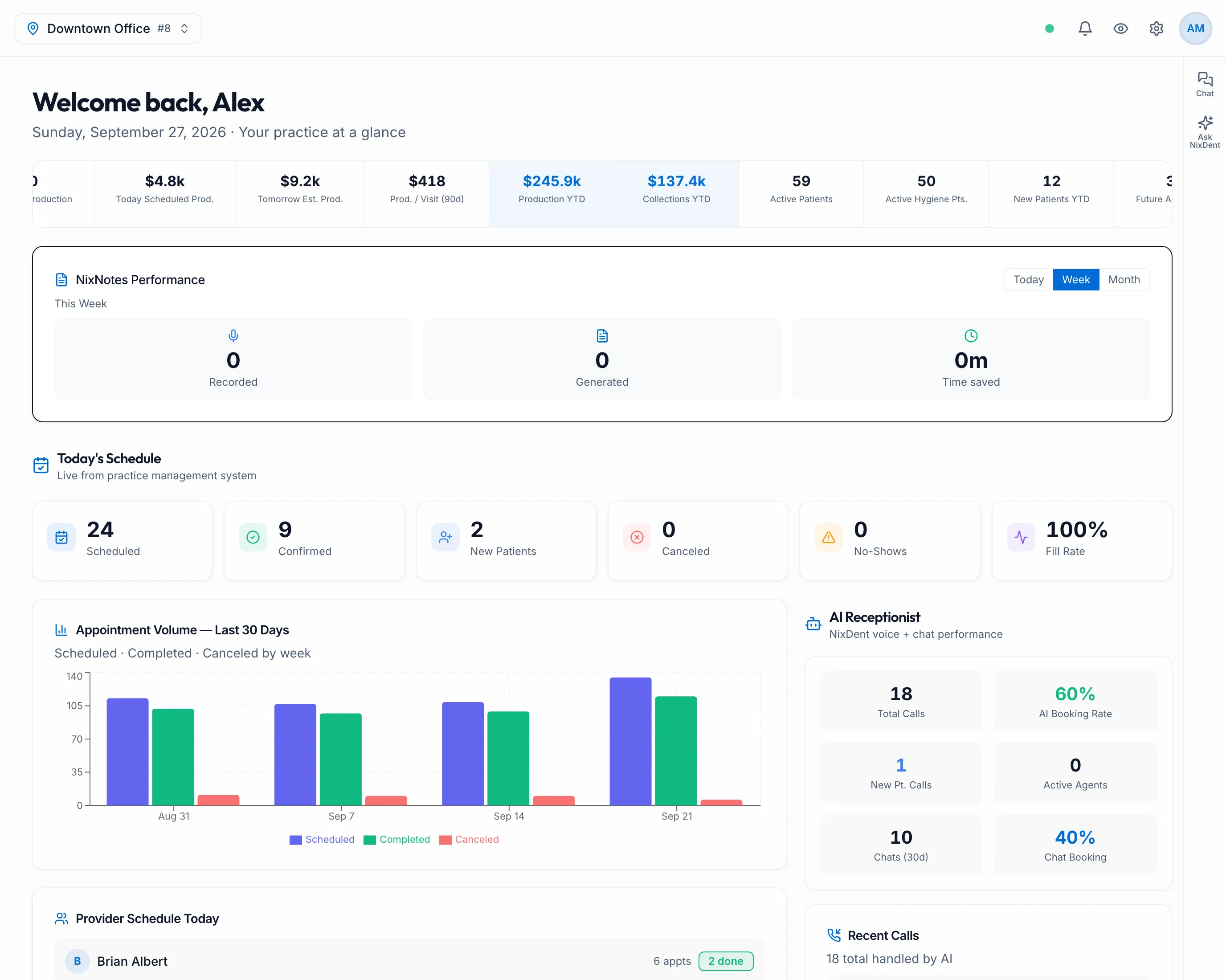
The dashboard is the first page you see after you sign in. Click Dashboard in the left menu to come back to it. At the top, a greeting (Welcome back and your first name) shows today’s date. The schedule and money figures show the office picked in the location picker at the top left, or every office you have access to when All Locations is picked.
Nothing on the dashboard can be changed from here. It’s a read-only summary. Schedule and money figures come from Open Dental; call and chat figures come from the AI receptionist. Figures can be a little behind Open Dental. Owners, Office Managers and Billing can fetch the latest with Pull fresh on Analytics.
The scrolling bar
Section titled “The scrolling bar”A bar of practice numbers scrolls across the top. Hover over it to pause it. It includes:
- Prior Day Production, Today Scheduled Prod. and Tomorrow Est. Prod.
- Prod. / Visit (90d) (production per visit over the last 90 days)
- Production YTD and Collections YTD
- Active Patients, Active Hygiene Pts. and New Patients YTD
- Future Appointments, Pre-Appt % and Hygiene Pre-Appt %
- AI Calls Handled (with the share that were booked) and Chat Booking Rate
The bar only appears once your practice is connected to Open Dental.
Today’s Schedule
Section titled “Today’s Schedule”Six tiles for today: Scheduled, Confirmed, New Patients, Canceled, No-Shows and Fill Rate. The small arrow under each tile compares today with yesterday.
Below the tiles:
- Appointment Volume — Last 30 Days: scheduled, completed and canceled appointments, week by week.
- Provider Schedule Today: each provider’s appointments today, with how many are done or canceled.
- NixNotes Performance, if your practice uses NixNotes: Recorded, Generated and Time saved, with Today, Week and Month buttons.
AI Receptionist
Section titled “AI Receptionist”The right-hand column covers the AI receptionist:
- Total Calls, AI Booking Rate, New Pt. Calls and Active Agents.
- Chats (30d) and Chat Booking, if your website chat has had conversations in the last 30 days.
- Recent Calls: the latest calls, with the caller, a colored status tag, a short summary and the time.
To read a whole call, go to Call Logs.
“No Practice Connected”
Section titled ““No Practice Connected””If you see this banner, NixDent isn’t connected to Open Dental yet, so the schedule and money figures are empty. The AI receptionist numbers still work.
If instead the top bar shows Practice offline, the connection was set up but has stopped syncing. Click it to open a support request to NixDent. The Practice offline link is in the top bar, not on the dashboard itself.
Related
Section titled “Related”- Run the morning huddle for a fuller view of today, yesterday and tomorrow.
- Watch the Pulse feed for what’s happening right now.
- A day at the front desk