

Review the outbound call log
Use the call log to see every call the AI placed for your office, hear the recording and read what was said.
Available if your plan includes Outbound Calls, once NixDent has switched on outbound calling for the office. See Set up AI calling campaigns.
Go to Outreach → Call Log. If your practice has more than one office, pick the office at the top left.
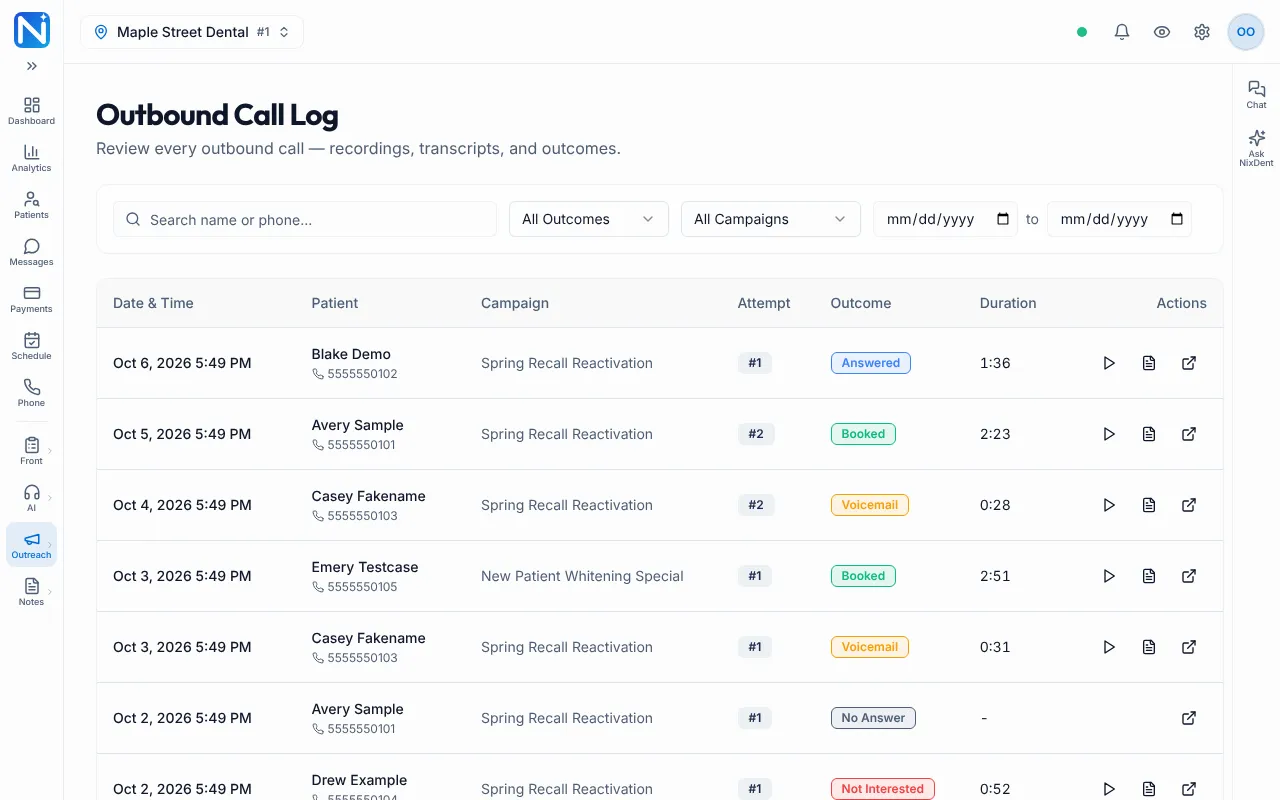
Find a call
Section titled “Find a call”The page opens with the newest calls first. Use the filters above the table:
- Outcome: choose one outcome, such as Booked, Answered, Voicemail, No Answer or Not Interested.
- Campaign: all campaigns, or one campaign.
- Two date boxes, a start date and an end date, to look at a window of time.
To find one person, open the Leads page instead. See Work your call leads.
Each row shows the Date & Time, Patient, Campaign, Attempt (which try this was for that person), Outcome and Duration.
Listen or read
Section titled “Listen or read”In the Actions column of each row:
- Click the play button (Play recording) to hear the call. Click it again (Stop recording) to stop. A small player opens with a Close player button.
- Click View transcript to read the call. The window shows the date and any notes the AI saved about the call.
- Click View lead to open that person’s lead page.
A row has no play button and no transcript button when the call was not recorded, for example when nobody answered.
What the outcomes mean
Section titled “What the outcomes mean”The AI works out the outcome itself when a call ends, mostly from its own summary of the call. For a call that matters, read the transcript rather than trusting the label alone.
| Outcome | What happened |
|---|---|
| Booked | The patient booked an appointment on the call |
| Answered | A person picked up and talked to the AI, but the call did not end in a booking or a refusal. The lead moves to Needs Follow-Up, so someone at the office should read the transcript and call back if needed |
| Reached | The AI reached the patient and tried to book, but the booking did not go through. The lead moves to Needs Follow-Up. Call the patient back to finish scheduling. (The Reporting page calls this Reached No Booking) |
| Voicemail | The AI left a voicemail |
| No Answer | Nobody picked up, or the call was too short to count as a conversation |
| Not Interested | The patient said no or asked not to be called |
| In Progress | The call is happening now |
Treat both Answered and Reached as “someone at the office should look at this call”.
Common problems
Section titled “Common problems”The log is empty. Check the office picker at the top left, and clear the Outcome, Campaign and date filters. If the campaign is new, calls only start inside your calling hours. See the calling hours table in Set up AI calling campaigns.
I can’t hear a recording. Try again in a minute. If it still won’t play, contact NixDent support with the date and time of the call.
I need totals, not single calls. Use Read outbound reporting.
Related pages
Section titled “Related pages”- Set up AI calling campaigns
- Work your call leads
- Read outbound reporting
- Call logs and chat logs (the logs for calls your AI receptionist answers)